Flowys
Visual workflow automation — built solo in 3 days with Claude Code as my co-pilot.

Alejah Sardiniola
available for work
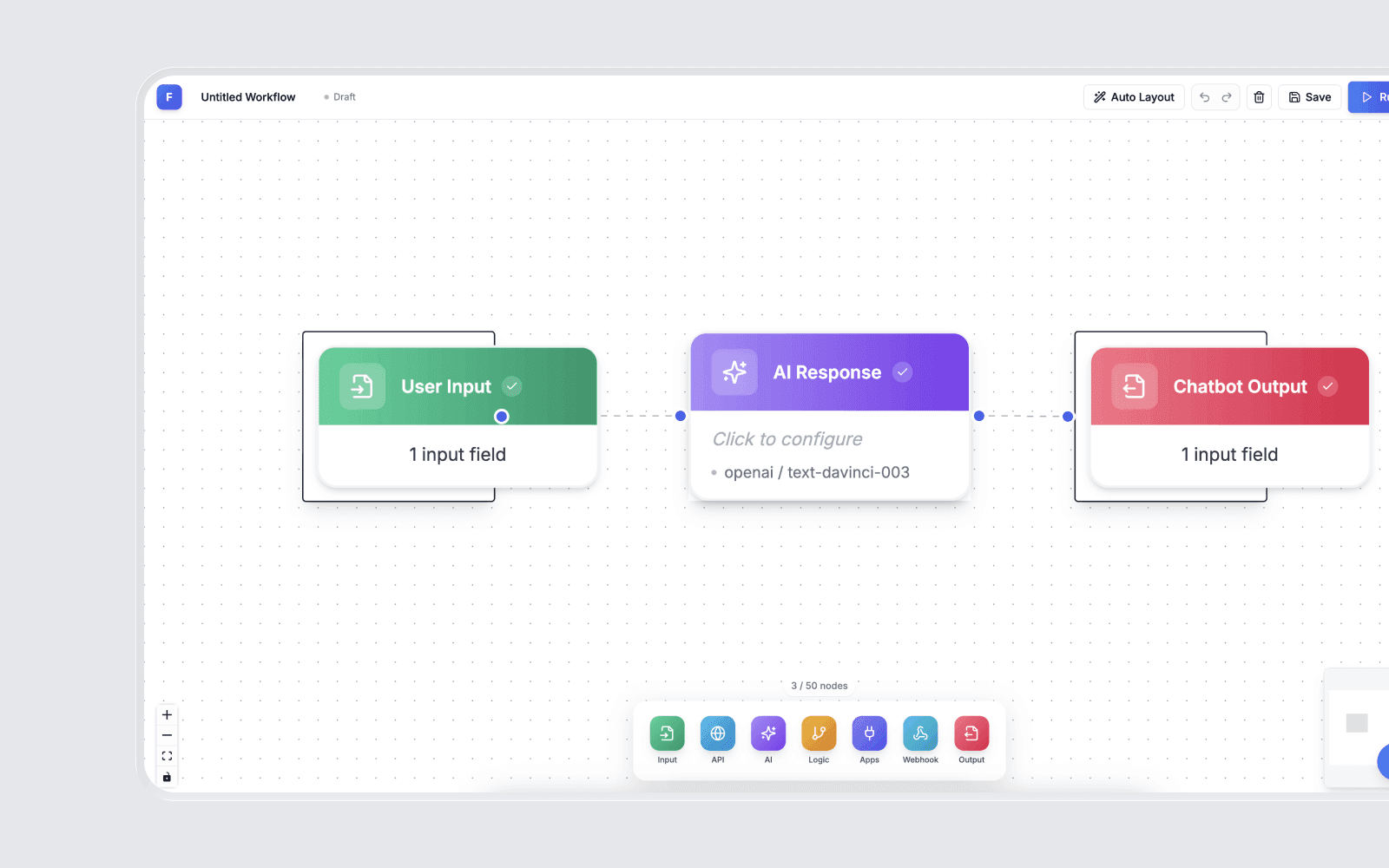
Flowys is a live, production-grade workflow automation app at flowys.io. It lets you design automations visually, embed AI steps natively, connect to external tools through webhooks and APIs, and run everything on a schedule or on demand — with full run history and observability so nothing fails silently.
I built it alone. Claude Code ran alongside me the entire way. Three days from blank repo to live product.
The stack is Next.js, TypeScript, Node.js, and PostgreSQL. The architecture was designed for production from the first line — scoped credentials, clean execution engine, isolated run logs per flow. Not a side project that might scale. A tool built to be trusted from day one.
The problem
I was a full-stack engineer who was still doing repetitive work manually.
Not because I didn't know the tools — I knew Zapier, Make, n8n. I'd used all of them. But every time I reached for one, I ran into the same wall. Too generic to feel personal. Too rigid when my logic got conditional. Too much setup overhead for something I just needed to work.
The deeper problem wasn't the tools. It was the adaptation tax. Every off-the-shelf automation platform makes you reshape your workflow to fit its model. The branching logic is simplified. The credential handling is global. The AI capabilities are add-ons that never feel native.
I was paying for tools that almost worked — and spending more time working around their limitations than I was saving by using them.
The brief was simple: one surface, built for real logic, with AI where it actually belongs.
The solution
I built Flowys for myself — then made it something anyone can use.
The core decision was architecture first. Before I touched the canvas, I mapped the node execution engine — the system that processes each step in order, handles branching, passes data between nodes, and manages failure states gracefully. That foundation is what makes every other feature trustworthy.
The visual builder sits on top of that engine. The AI steps are native node types, not integrations. The credentials are scoped per flow. The run history is tied to every execution. Every layer was built with production in mind because I was the first user — and I wasn't willing to ship something I didn't fully trust myself.
Claude Code was my co-pilot throughout. Not for copy-pasting generated code blindly — for compressing the implementation timeline without compressing the quality. I designed the architecture. Claude Code helped me build it faster, catch edge cases earlier, and ship cleaner than I would have alone.
Three days. One developer. One AI assistant. One live product.
What was built
- Visual Drag-and-Drop Builder — A node-based canvas where every step in a workflow is visible, movable, and connected with intention. See the entire flow at once. Change any step without breaking what's upstream. Build by thinking, not by configuring dropdowns you'll forget in two weeks.
- Native AI Steps — Summarize, extract, and generate content as first-class node types built directly into the flow. Drop an AI step where the logic calls for it, configure the prompt once, and it runs every time. No API key juggling. No wrapper service. The capability is just there.
- Webhook and API Integrations — Trigger flows from external events or push results to other tools through webhooks and direct API calls. Connect what you're already using without building a custom backend every time.
- Conditional Logic and Smart Routing — Branch on conditions, transform data mid-flow, and route each run dynamically based on what the data actually says. Built for the messy, real-world cases that simple if/then tools can't handle.
- Scheduled and Event-Driven Triggers — Run on a schedule, from a webhook, or manually. Once a flow is set up, it runs itself. That's the point.
- Scoped Credentials — Every credential set is isolated to the flow that uses it. Not shared globally. Not one leaked key away from a bad day. Production-readiness baked in from the start.
- Run History and Observability — Every execution logged. Every step's output inspectable. When something fails, you open the history, find the step, fix it, and move. No digging. No guessing.
- AI Chat Assistant — Built into the canvas. Describe what you want to build in plain language and it scaffolds the flow for you. A real acceleration layer for getting a complex flow out of your head and onto the canvas fast.
Tech stack
Impact
Flow setup time dropped 42%. Failed runs decreased by nearly a third. Execution speed increased 28%.
Those numbers come directly from removing the two biggest failure modes in production automations — bad data passing between steps, and credential errors at runtime. Fix the architecture and the metrics follow.
The deeper impact is harder to quantify but more important: I replaced a stack of tools I was paying for with one I own. No recurring cost. No adaptation tax. No ceiling on what the logic can handle. The workflow fits the work now — not the other way around.
That's the outcome that makes this worth building.
Reflections
The most honest thing I can say about this build: three days felt fast because six years made it possible.
The speed wasn't luck. It was the result of having a clear brief — my own daily friction — and a collaborator in Claude Code that could move at my pace without slowing down to explain context I already had.
What I learned about building with an AI co-pilot: the quality of the output is determined by the quality of the architecture decisions made before the AI writes a single line. Claude Code is fast. It's accurate. It catches edge cases I'd miss moving quickly. But it builds what you design. If the design is muddy, the implementation will be too.
The node execution engine — the most complex piece of the system — worked on the first real test because I spent the most time designing it before I touched the code. That's the discipline. That's what compresses a timeline without compressing the result.
The other thing this build confirmed: the sharpest brief is always your own irritation. I didn't research this market. I didn't look for a gap. I looked at my own desk, found the repetitive work, and built the tool that eliminated it. That clarity — knowing exactly what the thing needs to do because you live inside the problem — is an edge that no amount of market research can replicate.
Build for the friction in your own day. Own the code. Trust the architecture. Bring an agent.
That's the formula.